Redefining Security: Making Power Pages a trusted low-code, no-code platform
Power Pages is an enterprise-grade low-code SaaS platform designed for creating, hosting, and managing rich external business websites. It empowers both citizen (no code maker) and professional developers within organizations and governments to swiftly and securely develop and deploy custom external-facing business web applications. These applications are intended for use by an organization's consumers, partners, community users, and internal users.
By default, Power Pages offers enhanced control, protection, and security for administrators, website makers, and visitors. It ensures compliance with global, regional, government, and industry-specific standards, making it a trusted low-code application platform. The platform securely stores business data in Microsoft Dataverse and integrates seamlessly with Power Apps, Power Automate, Power Virtual Agents, Power BI, and Microsoft SharePoint.
This case study will explore how Power Pages empowers the overall "Maker" persona, beyond "Admins", to build and launch secure, compliant, and efficient business web applications, meeting the evolving needs of organizations and governments worldwide.
Existing product landscape
Gartner predicts that spending on information security and risk management products and services will grow by 11.3% to over $188.3 billion in 2023, with application security spending forecasted at $7.5 billion. Power Pages websites, particularly those in the public sector, government, citizen services, and financial services, are frequently targeted by cyberattacks. Customers often encounter security vulnerabilities due to misconfigurations and a lack of understanding of security tools. Feedback from Microsoft field and sellers indicates that Power Pages is not perceived as an enterprise-grade product, with security being a major concern for enterprises considering it for their digital transformation journeys.
Customers often lack confidence in the security controls available, especially since Power Pages allows business data to be exposed to external users. There is a need for comprehensive and advanced security and governance capabilities to make Power Pages a compelling choice for business decision-makers. Analysis of competitors suggests that robust security features and assistance for makers can differentiate Power Pages from other offerings like Out Systems, Mendix, or Salesforce.
Translating business requirement into user pain points
With the above understanding in place, and the business requirement to relook Security of Power Pages to move beyond "early adopters" to "early majority" of Power Pages customers, I collaborated with other leaders in speaking to several current users of Power Pages and identified the following emerging themes.
01. Misconfigurations by makers
Fragmented security, observability and governance capabilities make it hard to gain customer trust.
02. Security skill gap
Fusion teams (Admins and Makers) lack skills or often fail to collaborate on security.
03. Lack of discoverability of Security features
A large majority of our current security controls are hidden and have discoverability challenges
04. Lack of advanced & periodic security detection and security audit capabilities
Our customers need intuitive tools to secure their Power Pages Websites
05. Lack of security observability and tools
We don’t offer a comprehensive security first view and proactive detection of threats facing customers’ sites
Collaborating with other leaders and recognizing the above themes was crucial in aiding the team to understand the business needs and drive clarity for the design team.
Empowering the team to visualize a "North Star" for Power Pages security
Following the provided directions, I organized a full-day design-thinking workshop that included all design team members, partners, and project stakeholders. The goal was to envision a guiding direction for Power Pages security. This exercise allowed us to move beyond the obvious solutions and ensure that we not only met the business requirements but also delivered greater value and satisfaction to our customers.


Influencing outcomes
Recognizing the business requirements and the key need to propel Power Pages onto a new growth path, I introduced and discussed Maslow's Hierarchy of Needs model with the larger team. This was to ensure that our proposed directions align with the human value pyramid for an easy win.

The future
To create a comprehensive "security workspace" within the Power Pages design studio and incorporate Gen AI capabilities to help our "makers" secure the sites they develop, and consequently enable "admins" to safeguard the entire environment where these sites will reside.
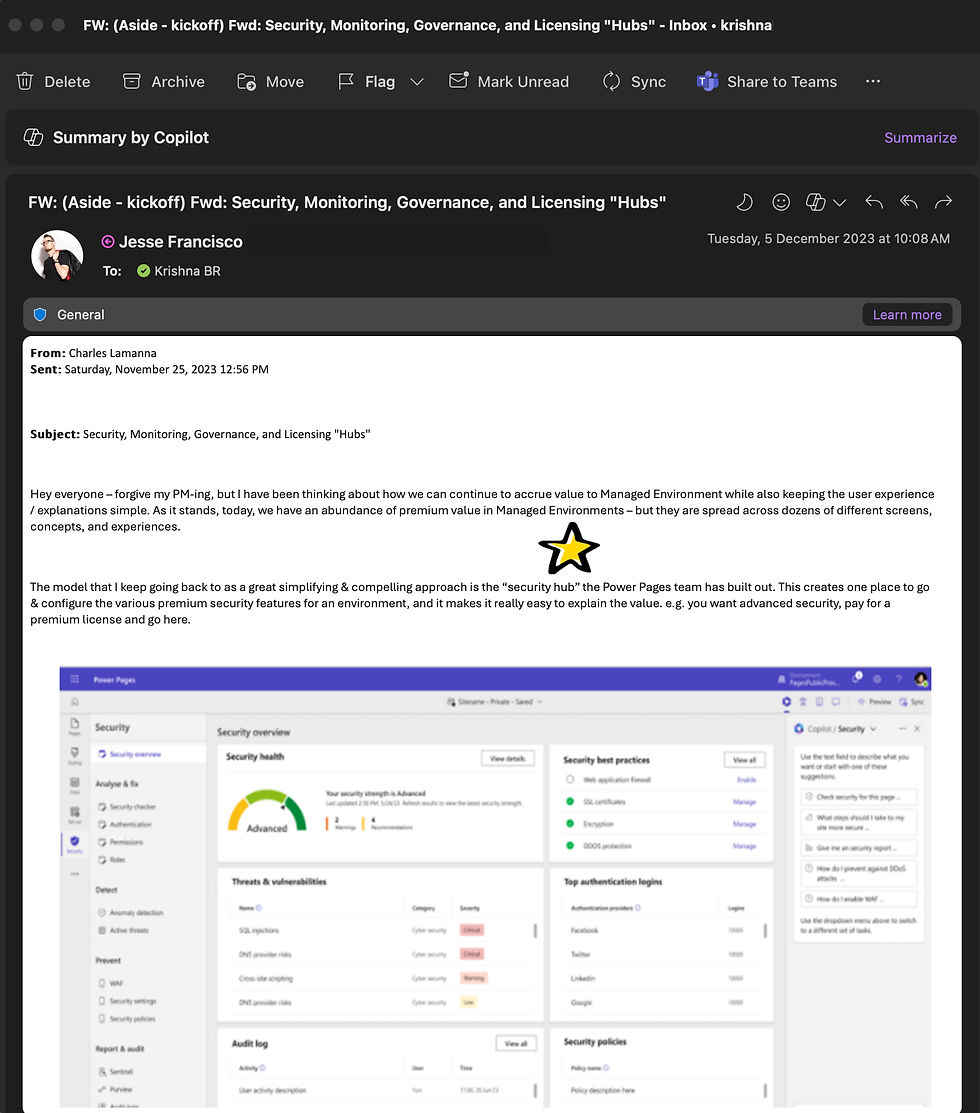
The Security workspace will be the fifth new addition to the studio, providing comprehensive security tools and features for makers to monitor, protect, and manage their sites.
Goals
To ensure 50% of the studio Monthly Average Usage (MAU) comes from the usage of security workspace.
To ensure improvement in the percentage of sites (before & after) that are using various security features being made available to the makers.
To ensure 25% of the sites built on Power Pages are channelized through Security Scan - a top of mind idea during brainstorming.
Design PoCs
With the insights, directions, and goals established, the design team was empowered to unleash their creativity and visualize proof of concepts that addressed the top security pain points of our makers.
This exercise not only encouraged the designers to integrate various existing security controls within Power Pages, innovate with Gen AI-first interaction patterns, and elevate the overall design quality but also brought together the Leadership, Product, and Engineering teams to discuss technical feasibility, costing, and a roadmap to bring this vision to life.


Early signals
Before moving forward, I nudged the design to collaborate with the research team to test the design PoCs with a few Power Pages users. This collaboration helped the design and product teams refine the directions before passing them on to engineering.

Refinement
Based on the early signals from user research, the designers were able to simplify the primary navigation of the security workspace, making "security" more obvious and understandable for makers.


Impact and Influence
The product team's email outlines the success of this exercise, which aligns with our established goals.
Additionally, the creation of the security workspace was highly praised by Microsoft's senior leaders, paving the way to develop stronger security controls for the "Admin" persona. This is a significant achievement and a testament to the impact of my design-led efforts at Microsoft.

Security workspace 2.0
With the launch of Security Workspace 1.0, we discovered that our customers consider it their primary resource for all security needs and compliance.
Based on detailed feedback from our workshops, the business recognized that customers desire more intuitive, automated tools to proactively identify and resolve security issues, streamline workflows, and reduce downtime. This insight led to the development of Security Workspace 2.0, where we aim to harness the power of Gen AI and Agents to deliver even greater value to our customers and position Power Pages as a gold standard in today's low-code, no-code market.
This along with the changing technology landscape, Design quickly went back to our drawing boards to redefine our guiding design principles to deliver delight for our new age users.


Revisiting a few key JTBDs
As a maker, I need alerts for vulnerabilities and DDoS attacks with clear steps to fix them, so I can quickly protect my site.


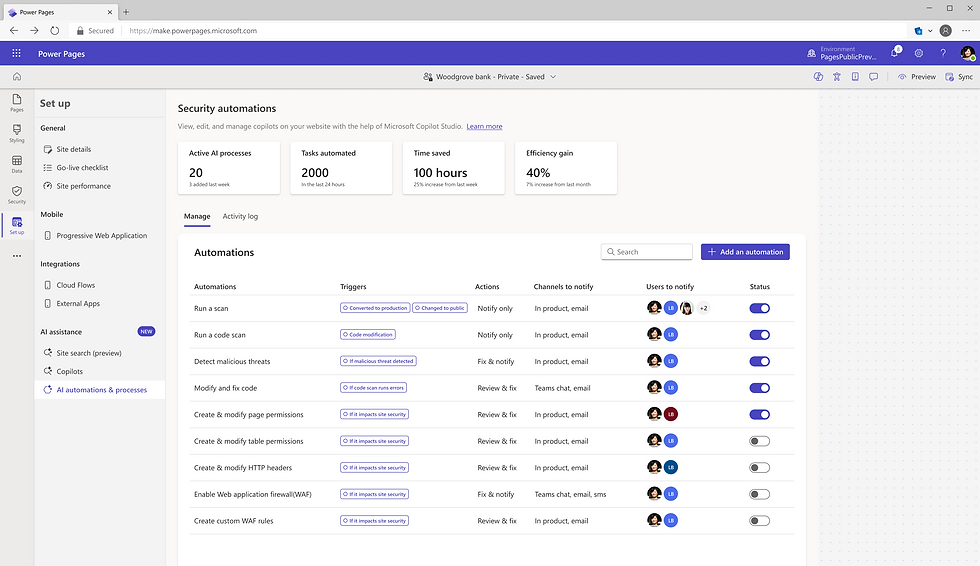
As a maker, I want to customize the security agent to focus on specific tasks, set triggers, and choose how often it runs.


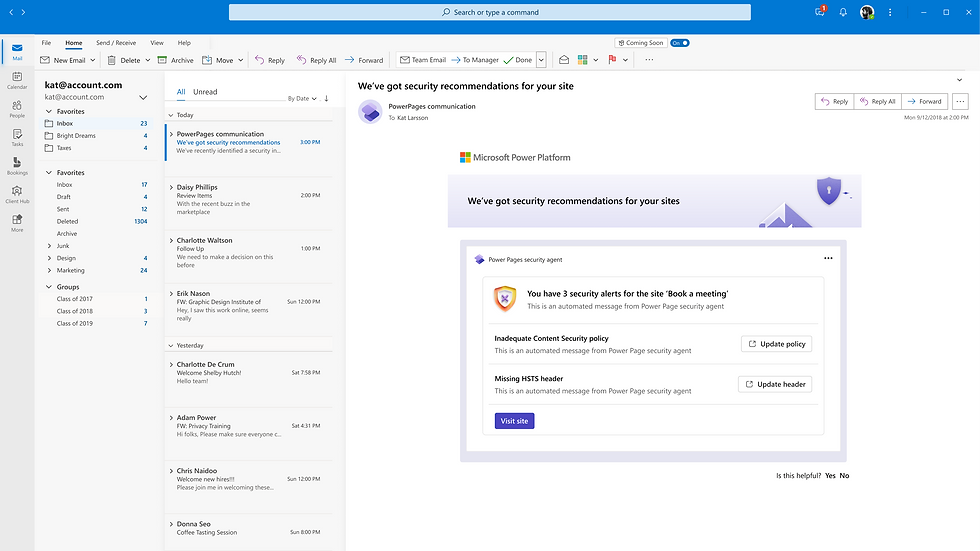
As a maker, I want email and in-product updates about security issues, so I can stay informed and aware of my site's protection even when working outside the product.

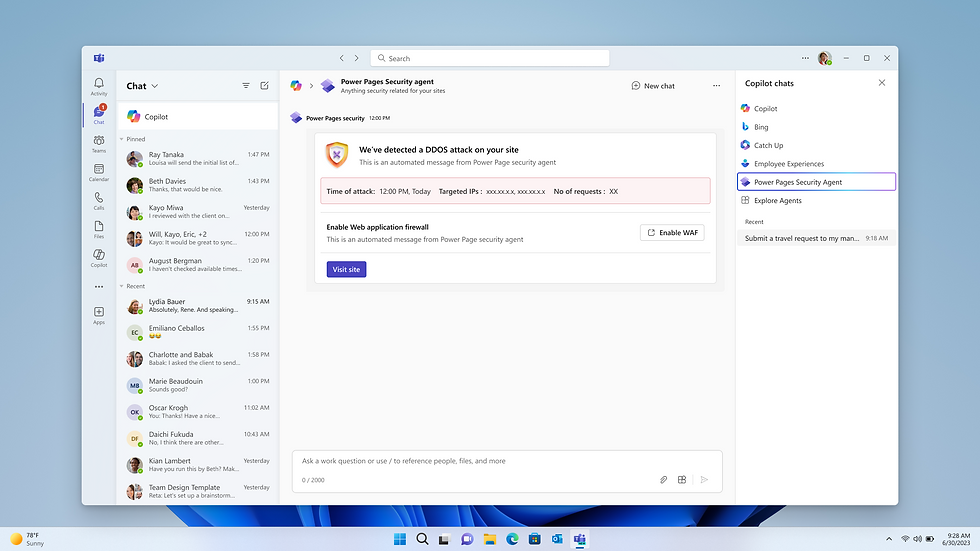
Moonshot( Vision 3.0)
